What does AI in customer support mean?
AI in customer support means: understand faster, write faster, and route better—without losing brand voice or quality. Think AI assist (draft replies), AI help (summaries), and smart automation.
A practical automation workflow starts with an AI draft grounded in your knowledge, keeps a human review before sending, and hands complex cases to a ticket owner with the conversation history attached. Automate predictable routing and summaries first; keep refunds, exceptions, and commitments under human control.
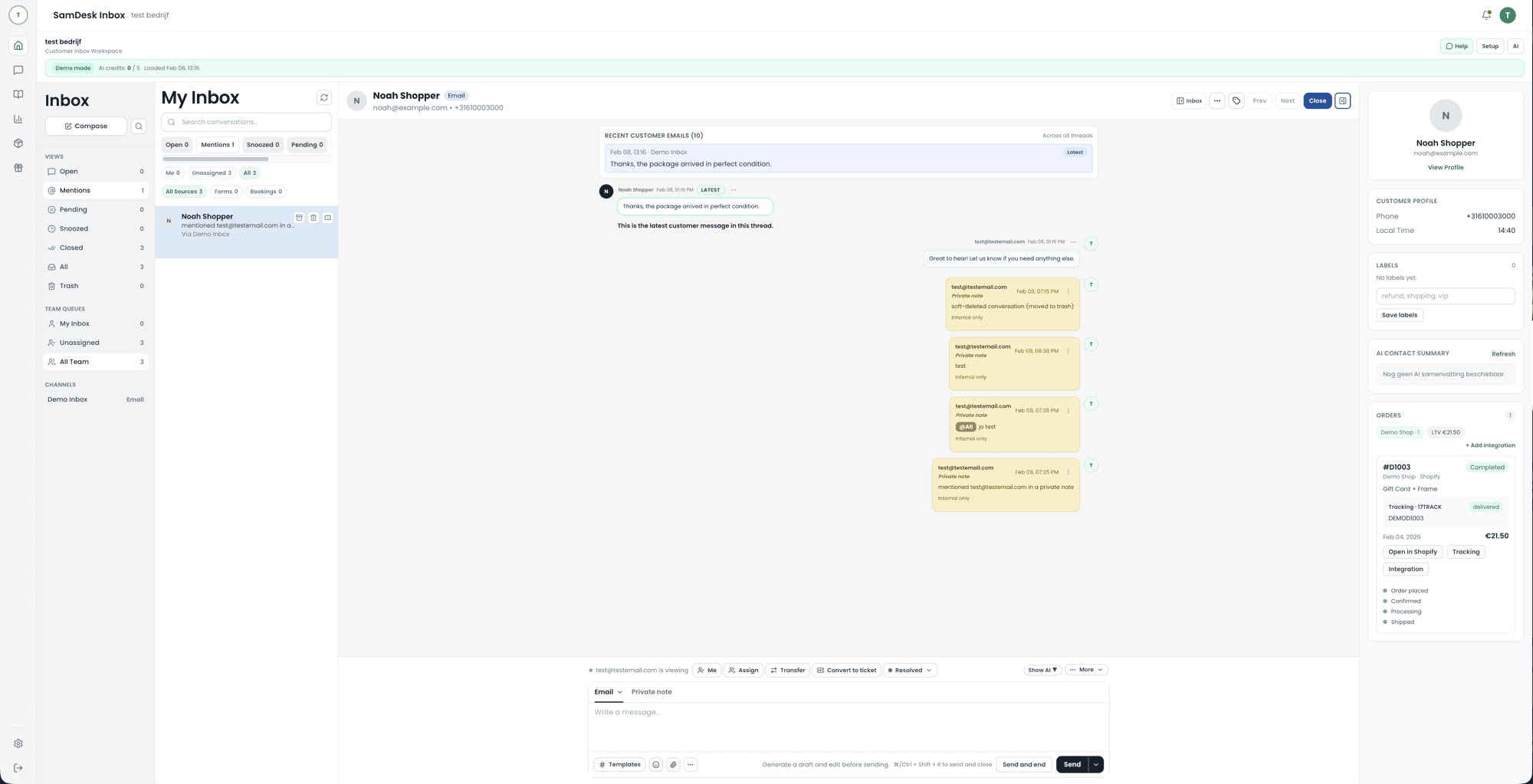
What it looks like
From a full queue to a sent reply, without anyone hunting through three screens for context.
What is an AI helpdesk?
An AI helpdesk is an ordinary helpdesk — inbox, tickets, ownership, knowledge base — with a language model taking over the steps that used to be manual: reading the incoming message, classifying it, pulling up the right order or article, and proposing a reply. It is not a separate product category. The word describes where the model sits, not what you buy.
Three quite different things get sold under that one name. Know which one you are switching on, because they differ in risk and in payoff.
AI assist
The model proposes, a human sends. The lowest risk, and the only one you can switch on day one without revisiting your policies.
AI agent
The model answers on its own inside boundaries you draw, and hands over the moment it steps outside them. Needs real sources and an escape hatch.
AI triage
No customer-facing text at all: classifying, tagging, routing, summarising, spotting duplicates. The least visible and often the biggest time saver.
Free tiers exist, but watch where they cap you: usually on the number of AI replies per month, on connecting to your own order and customer data (free tiers typically read only your public FAQ page), on handover to a ticket, and on being able to review what the AI actually sent. A free tier is fine for tasting the writing quality, and useless for judging whether it fits your working day — because that depends on exactly those four things.
The 10x checklist for AI support
- AI drafts, humans send (human-in-the-loop)
- Grounding: knowledge base + prior replies + policies
- Tone templates + category snippets
- Safe handoff: AI → ticket workflow (ownership + SLA)
- Measure: FRT, TTR, CSAT, deflection, QA samples
AI ticketing: smarter tickets, not magic
With AI ticketing, you want: auto-triage, summaries, next-step suggestions, and consistent replies. For AI help desk and help desk AI, it’s the same: AI helps agents, but your workflow remains the source of truth.
AI ticket / AI help desk
Summarize, label, prioritize, draft reply.
AI IT support
Repro steps, impact, escalation to support engineers.
Customer support automation (without annoying customers)
Customer support automation works when you nail the basics first: routing, ownership, SLAs, templates, and knowledge. Then you automate only what’s predictable.
How an AI chatbot in customer support actually works
Three generations hide under the same name. The oldest is a decision tree: fixed buttons, fixed answers, no understanding of language. Then came the intent bot, which pushes your question into a pre-trained category and returns the matching answer. What is sold today is the third kind: a language model that reads the question, searches your own documents and order data for the answer, and phrases that answer in its own words.
That difference is not academic. With the first two you know exactly what goes out, but the customer hits a wall the moment they ask something outside the script. With the third the reach is far wider, but quality depends entirely on where the model gets its answer. With no source underneath it invents something plausible — and in support, a plausible wrong answer costs more than no answer at all.
- Ask every vendor what the answer is based on. "Our model is trained on support data" is not a source; your knowledge base and your order data are.
- Watch the behaviour on unknown questions. A clean handover to a human is a feature, not a shortcoming.
- Test with your own ten hardest tickets, not with the examples from the demo.
Can you use ChatGPT for customer service?
For drafting text: fine. For running your support operation: not without building something around it. The problem is not writing quality, which is its strongest suit. The problem is that a standalone chat window does not know what this customer ordered last week, whether the parcel arrived, what your colleague promised yesterday, or what your return window is. That is exactly the information the answer depends on.
On top of that there is no ticket, no owner and no history. Two colleagues pasting the same question into their own chat window produce two different answers and nobody notices. And you are pasting customer data into a system whose processing terms and retention periods you need to be able to account for — something to settle with whoever owns privacy in your company before it becomes a habit.
The workable version is the same model, but inside your helpdesk: it sees the order and the history, it drafts, and a human presses send. SamDesk runs on your own AI key, so you choose which model sits behind it and usage settles through your own provider account.
Which AI chatbot is best? How to judge that yourself
There is no winner that is best for every webshop, and any list claiming otherwise is selling something. What does exist: five questions that expose the difference in an afternoon, using your own tickets.
- Can it reach your order data, or only your FAQ page? Without order context it stalls on the question you get most.
- What does it do when it does not know? Handing over with the context attached is good; improvising is a liability.
- Can a human step in before the message goes out, and how many clicks does that cost per ticket?
- How good is the output in the languages you actually sell in? Test with real customer sentences, typos included.
- How is it billed, and what happens to that bill in your busiest month?
What AI in customer service costs
Three models get mixed together, and the model matters more than the rate. Per resolution sounds fair but grows more expensive the better the AI performs. Per seat is predictable, until you want to scale up temporarily for a peak week. Your own AI key means you pay for the software and settle model usage directly with your provider, at their rate.
The line item nobody quotes appears on no price list: cleaning up your knowledge base. AI grounded on outdated return terms and stale shipping copy spreads those errors faster than your team ever could. Budget that cleanup up front, not afterwards.
AI on returns: where it pays off immediately
Returns are the first place AI genuinely saves time in a webshop, for one reason: the questions are numerous, repetitive and fully answerable from data you already hold. "Can I send this back", "where is my money", "how do I ship it" — no judgement involved, only lookup.
- Let AI calculate and state the return window for that specific order, instead of pointing at your policy page.
- Let it extract and tag the return reason from the message — that produces the segmentation you use to fix product pages.
- Let it offer an exchange where that fits. A successful swap keeps the revenue without making the customer work for it.
- Keep the refund itself with a human until you have watched the rest hold up for months. Sending money back is the one step an apology cannot undo.
The wording that closes this chain sits in the return and refund template guide. How much contact one return currently generates comes out of the return contact rate calculator.
Is AI replacing customer service?
The number of messages a human literally types out goes down. The number of people you need does not fall at the same rate, and that is because of what is left over. AI takes the lookup work first: where is my parcel, what is the return window, has my money been sent back. What your team keeps is the harder half — the exceptions, the angry customer, the cases where you choose between goodwill and policy.
That changes the job more than it changes the headcount. Support is often called a stressful role, and the weight usually is not the difficult customer: it is volume, repetition, constant screen-switching, and apologising for something you cannot see or fix yourself. Those four are exactly what a well-configured AI layer removes first. What remains is reviewing, handling exceptions, and keeping the knowledge base correct — because once AI proposes answers, the quality of your documentation is the quality of your customer service.
One practical rule if you plan to adjust staffing: scale down only after you have been through a full peak season with AI running, never before it. The months where things break are the months with the highest volume, and that is when you want people who already know your process.
AI for the IT help desk is a different problem
A lot of what you read about AI help desks is about internal IT support: password resets, access requests, provisioning a laptop. Those requests are standardised, come from colleagues, and can be executed by a system that holds the permissions. That is why assistants and ITSM tools landed there first.
Klantenservice heeft een strengere randvoorwaarde: elk antwoord is een toezegging aan iemand buiten je bedrijf, meestal over geld. Een verkeerd toegekende retour draai je niet terug met een tweede bericht. SamDesk is voor die tweede situatie gebouwd. Zoek je een systeem voor interne IT-tickets, dan past een ITSM-tool beter en zeggen we dat liever meteen.
When AI in customer support creates frustration
Consumer programmes like Radar regularly expose the other side: a bot that does not know the answer, a customer who keeps typing "agent" and gets nowhere, working around the tool as the only way out. Frustration rarely comes from AI existing; it shows up in three recognisable situations. One: the bot answers questions the knowledge base has no correct answer for, and invents something that sounds like a commitment. Two: there is no visible route to a human, so the customer starts looking for ways around the tool instead of solutions. Three: at handover the conversation disappears, and the customer has to repeat everything.
Taking that seriously means deciding first what AI does not take over. Hand the lookup questions to the AI layer: order status, return window, delivery, opening hours, and anything literally answered in your knowledge base. Keep for your team everything where money, policy, or empathy requires a judgement: complaints, goodwill, disputes, and customers who already tried twice to solve it themselves. That is not a technical limitation; it is the agreement with your customer that a human makes the commitments.
Judge your AI support with the numbers that make that frustration visible: how often an AI conversation ends in a handover to a human, how many of those conversations reopen afterwards, what first response time and resolution time do compared with the period before the AI layer, and whether satisfaction after AI conversations differs from conversations a human handled start to finish. Compare those numbers with your own previous period rather than with vendor percentages; every team has a different knowledge base, different questions, and therefore its own ceiling.
FAQ
What should I automate first in my help desk?
Start with the work the customer never sees: triage. Labelling, prioritisation, summaries, and duplicate detection cost an agent minutes per ticket and carry zero complaint risk. Once that runs, draft replies are the next step, and autonomous answers the last — and only for questions literally answered in your knowledge base. Companies that start with autonomous answering switch on the riskiest step first.
What is an AI chatbot?
An AI chatbot is a conversation window where a language model formulates answers instead of a pre-set decision tree. It differs from the old menu-driven bots in two ways: it understands a question phrased differently than expected, and it bases its answer on sources you point it at — your knowledge base, your policy pages and ideally your order data. Without those sources it invents something plausible, and that is exactly the risk you manage.
How do you use AI for customer support? The order to do it in
In four steps, in this order: (1) switch on AI triage — labelling, prioritising, summarising, spotting duplicates. None of it touches the customer, so you can enable it today. (2) Switch on draft replies, with a human still sending every message. (3) Clean up your knowledge base before you let anything answer on its own; the AI spreads your outdated return copy faster than your team ever could. (4) Only then let an AI agent handle the questions that involve no judgement, with a hard handover to a human the moment it falls outside them. Keep refunds and exceptions with a human.
Does AI customer service actually exist yet, or is it still a promise?
It exists and it runs, but unevenly. What demonstrably works: summarising, tagging, routing, translating and drafting replies — all with a human pressing send. What works variably: answering standard questions on its own, which stands or falls on whether the model can reach your order data. What does not work yet: judgement calls on exceptions, goodwill and complaints where someone is angry. So judge a vendor not on what the system can do, but on what it does when it does not know.
Where do I find the return rules my AI answers must match?
An AI layer can never be better than the return policy it reads from, so get that right first. The statutory cooling-off period, the exceptions and what a webshop return policy must contain are worked out in streamlining returns handling. The ready-made wording sits in the return and refund template guide.
Is AI powered customer support the same as a chatbot?
No. A chatbot is one channel. AI in customer support should run through the whole operation: drafts, summaries, routing, and QA.
What are good AI tools for customer support?
Tools that can ground on your knowledge base, with guardrails and clear workflows (ownership + SLA). Otherwise you get hallucinations and inconsistent replies.
Is the IT help desk being replaced by AI?
The first line shrinks; the rest does not. Password resets, access requests and standard questions are exactly the type of request a system with the right permissions can execute itself, and that is where manual work disappears fastest. What stays: incidents where nobody yet knows what broke, changes that need approval, and the people who decide what the AI layer is allowed to do. The work shifts from executing to reviewing and configuring.
Is AI taking over help desk jobs?
It changes the job description before it changes headcount. Two things grow the moment AI runs alongside a team: knowledge management, because an AI layer is only as good as the documentation it reads, and quality control, because someone has to sample what was promised. Teams that cut first and configure afterwards meet the consequences in the next peak season.
What is the best helpdesk software?
That depends on who raises the ticket — a customer or a colleague — and that choice is separate from the AI question. The full comparison, including the products worth shortlisting, sits on the help desk hub and in the ticketing systems overview.
