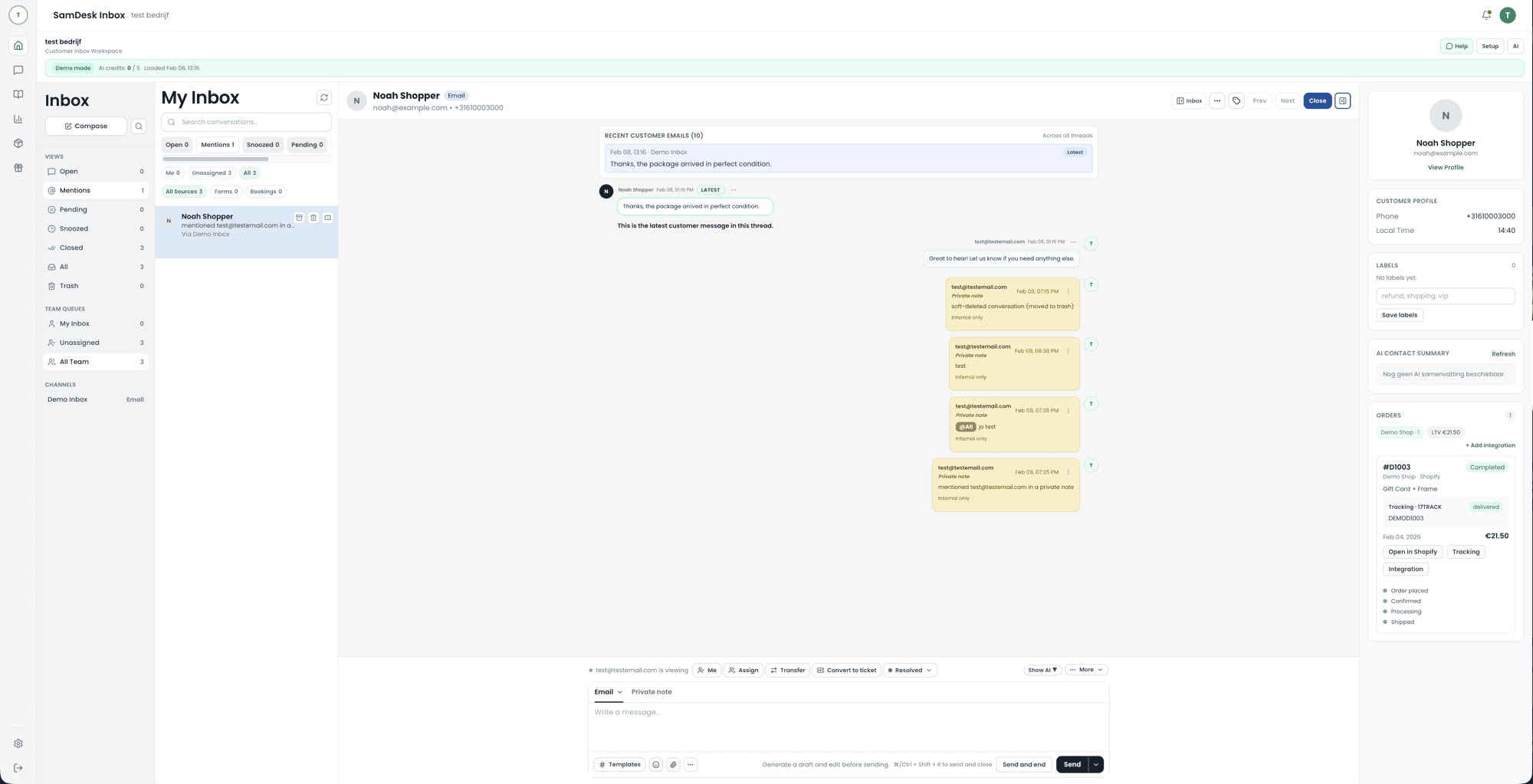
What it looks like
From a full queue to a sent reply, without anyone hunting through three screens for context.
What is ticketing?
Ticketing turns scattered requests into manageable items: a customer support ticket with owner, status, and next step. With solid ticketing tools, your support desk never loses control of every open ticket.
ITIL, Jira, SAP: which tickets do they actually mean?
Start comparing and you meet names that are all called "ticketing system" while doing very different work. The distinction that matters is not the feature list but who raises the ticket: a colleague or a customer. Here is what sits behind the best-known terms.
- ITIL ticketing system. ITIL is not a product but a framework for IT service management. So an "ITIL ticketing system" is software that follows ITIL vocabulary: an incident (something is broken), a service request (I want to request something), a problem (the underlying cause of recurring incidents) and a change (a modification that needs approval). If you hear those words in a demo, you are looking at internal IT software, not customer service software.
- Is Jira just a ticketing system? No. Jira Software started as an issue tracker for development teams: user stories, bugs and sprints. Jira Service Management is the separate product that turns it into a service desk, with a portal, queues and SLAs. Both store "tickets", but Jira Software organises work your team invents itself, while Jira Service Management organises requests arriving from outside the team. For a webshop team it is mostly a strong choice when support and engineering already share a backlog.
- Is SAP a ticketing system? SAP is fundamentally an ERP suite for finance, inventory and logistics, so no. There are SAP components that do ticket work: SAP Solution Manager for incidents around your own SAP landscape, and SAP customer service modules for service notifications. Confusingly, SAP's own vendor support channel is also called a ticketing system. When in doubt, ask which component someone means before comparing it to a help desk.
There is no objective top ten, because every list mixes these two groups together. Answer first whether your tickets come from colleagues or from customers; that single question removes half of any ranking.
Helpdesk ticketing, IT service management, and customer support
Three different jobs hide behind the same word. Helpdesk ticketing means logging a request, giving it an owner and a status, and tracking it until it is resolved — that mechanic is identical everywhere. What differs is who raises the ticket and what has to happen next.
IT service management tools serve internal users: an employee reports a broken laptop, a request needs approval, an incident links to a change and to an asset register. Customer support ticketing serves people outside the company: an order is late, a return needs approving, an invoice has to be reissued. The second case needs order and customer context beside the reply box; the first case needs approval flows and a configuration database. Buying a tool designed for the other job is the most common reason a rollout stalls.
Most of these products are sold as SaaS — software as a service, meaning the vendor hosts and updates it and you pay a recurring fee instead of running your own servers. That is worth checking explicitly for ticketing, because a self-hosted alternative moves the licence cost into hosting, upgrades, and someone's maintenance time.
Where TOPdesk, ServiceNow, and Jira actually sit
These names dominate ticketing searches, and all three are built primarily for internal service delivery rather than for customer-facing support.
TOPdesk is service management software from a Dutch vendor, used by IT, facilities, and HR service desks. It is organised around ITIL-style service management practice — incidents, requests, changes, a self-service portal, and a service catalogue — and it is a capable product for that work. It is a poor match for a small ecommerce team, not because of quality, but because none of its strengths apply when the person raising the ticket is a customer waiting on a parcel.
ServiceNow is not just a ticketing tool. It is an enterprise workflow platform where IT service management is one application among many, extending into HR, security, and custom business workflows. That breadth comes with implementation weight that only large organisations can absorb. Jira Service Management sits closer to development teams and works well when support and engineering already share a backlog.
There is no objective top ten in this category, because the lists mix these internal service platforms with customer support desks. Decide first whether your tickets come from colleagues or from customers; that single question removes most of any ranking.
The ten ticketing tools you will actually meet
Published top-ten lists rank products that are not competing for the same job, which is why they rarely help. The list below is sorted by who raises the ticket instead. Find your row first; the shortlist inside it is short enough to test properly.
Built for customers writing in
- Zendesk — the category reference: broad channels, mature reporting, priced per agent and it shows as the team grows.
- Freshdesk — a general-purpose support desk, often the alternative shortlisted next to Zendesk.
- Help Scout — inbox-shaped ticketing that hides the ticket mechanics from the customer.
- Intercom — messaging-led, strongest when support happens inside your own product.
- Gorgias — built specifically around ecommerce order questions and returns.
- SamDesk — tickets plus Shopify or WooCommerce order context for smaller ecommerce teams.
Built for colleagues raising internal requests
- ServiceNow — an enterprise workflow platform; ITSM is one application on it, not the whole product.
- TOPdesk — ITIL-shaped service management for IT, facilities and HR desks.
- Jira Service Management — the natural pick when support and engineering already share one backlog.
- osTicket — open source and free to licence; you carry hosting, upgrades and maintenance yourself.
A tool from the second list can serve customers, and one from the first can serve staff. Both work, and both cost you the configuration effort of bending a product away from what it was designed around.
What a helpdesk ticketing system costs
Look at the pricing model before the feature list, because the model decides how the bill behaves as you grow. Per agent per month is predictable with a stable team and punishes seasonal staff. Per ticket follows real volume, so a busy month costs more. A flat fee is easy to plan but often oversized for a small team. A free tier works at low volume, as long as the limits on channels, history, and reporting do not create work elsewhere.
Add the costs that never appear on a pricing page: migrating existing conversations, building the integrations you need, configuring queues and templates, and the ongoing hours someone spends maintaining all of it. The comparison that matters is the cost per resolved conversation, not the seat price — a cheaper tool that forces agents to check three other screens is not cheaper. See current SamDesk pricing, or read when a free ticketing system is enough.
What do you need to make the right choice?
Not every ticketing system solves the same problem. Compare the full support workflow here, then use the focused guides when you need pricing, a free starting point, or the practical details of ticket workflows.
| What you need to evaluate | Read next | Why |
|---|---|---|
| Choose ticketing software | This ticketing page | This is where intake, ownership, SLAs, workflows, and reporting fit together. |
| Free ticketing system | Free ticketing system | That page separates support tickets from event ticketing and free event ticket sales. |
| Ticketing software pricing | SamDesk pricing | Price depends mostly on agents, AI, SLAs, and reporting, not on one isolated feature. |
| How does the workflow work in SamDesk? | Ticket Workflows | The feature page shows the product side: status, owner, labels, and follow-up. |
Ticketing systems: the checklist
- Support ticket intake (inbox/forms) + categorization
- Ownership + SLAs + escalation
- Automations (routing, templates, status updates)
- Reporting: volume, backlog, agent performance
Ticketing tools: the 10x way to manage support tickets
Many ticketing systems are fine as a database but weak as an operation. A 10x support desk does three things exceptionally well: (1) prevents tickets from staying open forever, (2) makes ownership crystal clear, (3) keeps replies consistent via knowledge + templates.
Open ticket → next step
Every open ticket has an explicit next action. No “we’ll look into it”.
Customer ticket context
Order, customer and history visible for faster support tickets.
Service desk / IT support ticket
For IT: clean intake + priority + escalation. Ticket IT support without noise.
Help desk ticket standardization
Templates, macros and workflows keep replies consistent across agents.
Support desk vs service desk vs help desk
A support desk focuses on customer issues. A service desk often covers broader services (ITIL, internal services). A help desk is the general umbrella. SamDesk flexes across ecommerce support, internal IT, or a customer service desk—with the same ticketing foundation.
SamDesk vs Zendesk/Freshdesk/Jira (ticketing angle)
Zendesk is broad enterprise, Freshdesk is strong out-of-box, and Jira Service Management excels for IT/service teams. SamDesk is the focused path: ticketing systems + workflows + context + knowledge, optimized for speed.
Support ticket workflow (with Ticket Workflows feature)
In SamDesk, every ticket has a status, owner, and full conversation history. The product page shows how routing, labels, and follow-up work in the app.
See Ticket Workflows →FAQ
What is a ticketing system?
A ticketing system collects customer questions from email, chat and phone in one place, giving each one a status, an owner and a history. You always know who is working on what, and nothing stalls because someone was away.
Looking for an event ticketing system?
Then you’re in the wrong place. “Ticketing” means two very different things. For selling tickets, scanning at the door and seating plans you need an event platform. SamDesk is a support ticketing system: it handles customer questions after the purchase, not the ticket sale itself.
Is there a free ticketing system?
Yes, and it’s a serious option. osTicket is open source and free, but you host and maintain it yourself. Most paid tools also offer a free tier or trial. The real question isn’t “what does it cost” but “who will own it” — a free system without an owner becomes a second inbox nobody checks within six months.
What is a CRM ticketing system?
A ticketing system with customer history right next to the ticket: previous orders, conversations and complaints. You notice the difference on a customer’s second question — you see what went wrong last time instead of asking again. More on our CRM page.
What are the best ticketing systems?
It depends on your team. Zendesk and Freshdesk are broad and mature, but get expensive as you add agents. osTicket and AzureDesk are cheap to free, with more self-management. SamDesk focuses on smaller ecommerce teams that want customer questions and order history in one screen. Choose on what your team does daily, not on the feature list — most tools can do almost everything, just not equally pleasantly.
What is a help desk ticket?
A help desk ticket is a support request with status, owner, and history. The goal: nothing gets lost and everything is measurable.
What does help desk mean, and is that the same as ticketing?
Not quite. Ticketing is the mechanic: every request becomes a numbered item with an owner and a status. A help desk is everything around it, including the people, agreements, knowledge base and reporting. You can run ticketing without calling it a help desk, and a help desk can exist without a ticketing system — though that rarely lasts beyond two people. The full explanation, including synonyms and the difference with a service desk, sits on our help desk page.
How do I reduce open tickets?
Combine clean intake + routing + knowledge base deflection. Track backlog, set SLAs, and automate status updates where possible.
What does SaaS stand for?
Software as a Service: the vendor hosts and updates the application and you pay a recurring subscription instead of running servers yourself. Almost every ticketing product on a shortlist is sold this way. The exception worth naming is self-hosted open source such as osTicket, where the licence is free but hosting, upgrades and maintenance move onto your side of the line.
Is ServiceNow just a ticketing tool?
No. ServiceNow is an enterprise workflow platform, and IT service management is one application running on it — the same platform also carries HR, security and custom business workflows. Ticketing is a feature of it, not a description of it. For a support team of five that breadth is the problem, not the appeal: you are buying and configuring a platform to run a queue.
Is TOPdesk ITIL, and is it any good?
TOPdesk is organised around ITIL-style service management practice — incidents, requests, changes, a service catalogue and a self-service portal — and vendors in this category commonly hold PinkVERIFY-style certification for those processes; check the current list with the vendor if certification is a procurement requirement. On quality: it is a solid product for the work it targets, which is internal IT, facilities and HR service desks. “Good” only means something relative to that job. For a customer queue about parcels and returns, none of its strengths apply and its structure gets in the way.
What are the top 10 ticketing software products?
Any honest answer splits in two, because internal service platforms and customer support desks do different work. Customer-facing: Zendesk, Freshdesk, Help Scout, Intercom, Gorgias and SamDesk. Internal-facing: ServiceNow, TOPdesk, Jira Service Management and osTicket. Sorting them that way removes most of a ranking before you compare a single feature.
