One inbox
Unify email, chat, and follow-up in one workflow. Agents see what is open and who owns it.
Webshop support
Webshops get repeat questions about shipping, returns, refunds, and orders. SamDesk combines inbox, tickets, customer data, and order context so support teams reply faster without switching between screens.
Daily webshop questions
Unify email, chat, and follow-up in one workflow. Agents see what is open and who owns it.
Connect questions to order, customer, and history. WISMO, return, and refund questions move faster.
Use consistent replies for common situations and improve them with human review.
A mailbox can receive questions, but it misses status, ownership, and operational context. Once multiple agents work together, duplicate replies, missed follow-ups, and unclear priorities appear.
SamDesk adds that layer with tickets, workflows, snippets, and KPI tools. Also see our WISMO calculator, the page on customer service automation, and the tool that helps you calculate support handling time.
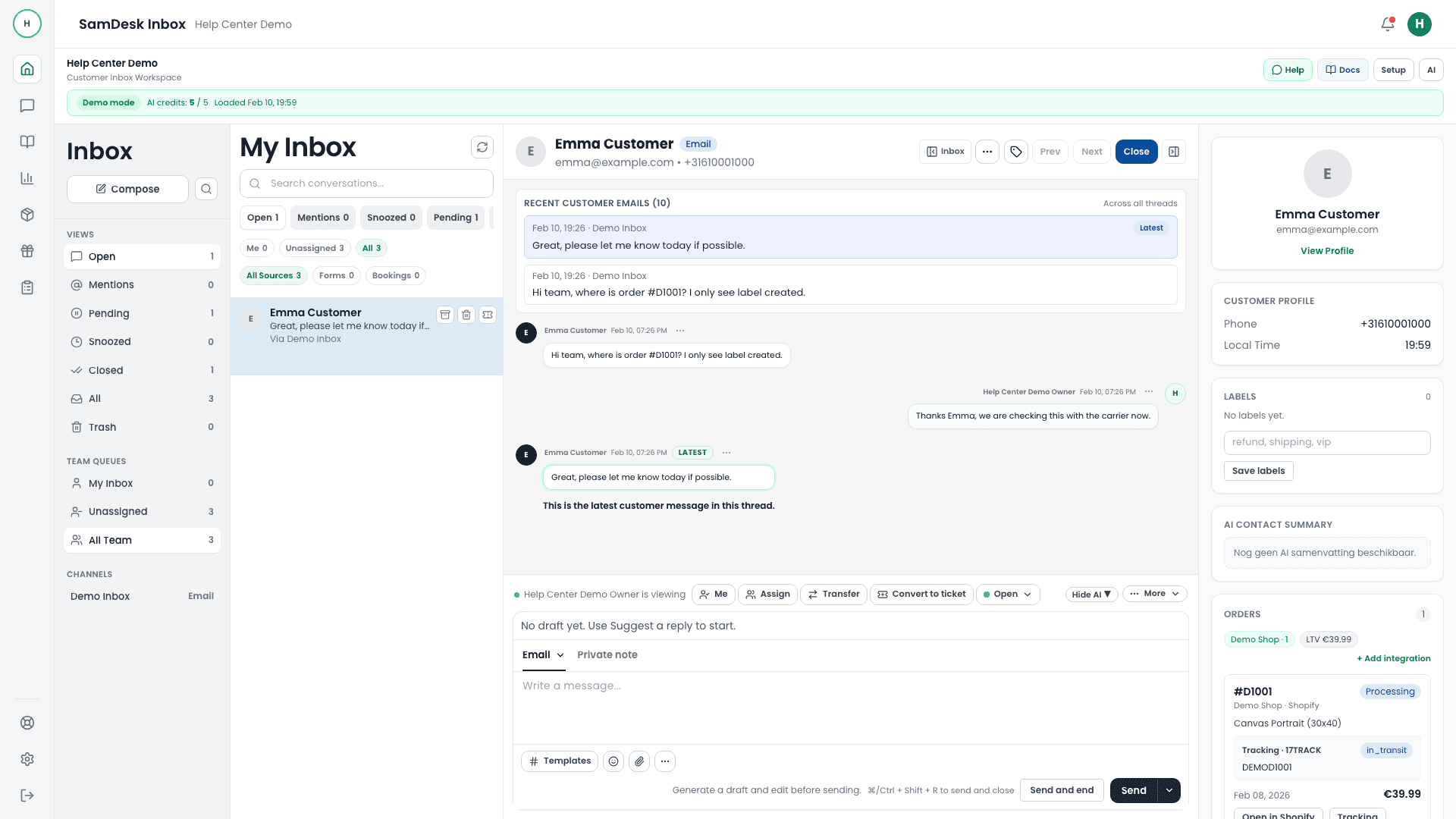
A generic helpdesk stores conversations. An ecommerce help desk stores conversations next to the order they are about, and that single difference decides how long a reply takes. Most support minutes in a webshop go into looking up which order a message refers to and what was promised earlier, not into writing the answer itself.
Before comparing helpdesks, be honest about which store platform you run and how deep the integration needs to go. Every vendor claims support for the major platforms; the difference is whether that means reading order data or actually acting on it.
What that order context looks like in SamDesk is on the Shopify and WooCommerce order context page.

There is no single best ticketing system, and every list claiming otherwise is ranking by something that is not your situation. What does transfer between companies is the shape of the decision: match the tool to your volume, your team size and who will administer it.
Compare the pricing model before the number. Per-agent pricing is predictable until you want seasonal help; per-ticket pricing scales with your busiest month rather than your team; per-AI-resolution pricing grows as the AI gets better at its job. Price your peak month, not your average one, and count onboarding, integrations billed separately, and the admin hours the platform needs. Build a twelve-month view per candidate with migration as a genuine cost line.
And judge candidates with a pilot on real traffic, not a demo. Move one queue first and keep the old system running behind it, rebuild only the macros the pilot needs, validate order context before cutover, then compare first response time, resolution time, reopen rate and how often managers override routing.
Carriers publish pages about lost and swapped parcels, but they are written for the recipient. As a webshop you sit on the other side: the customer contacts you, not the carrier. These five situations make up most of your delivery tickets. Fix per situation what the first reply is, which evidence you need and when you absorb the cost yourself — so nobody on your team has to reinvent it case by case.
As long as tracking still moves it is a delay; once the status has been frozen for days you treat it as lost. Fix that boundary in days, otherwise one agent waits while another opens an investigation straight away.
The most expensive argument in ecommerce, because the scan says it went fine and the customer says it did not. The outcome rarely depends on who is right, but on how much you are willing to lose to keep the customer.
Two customers have each other's order. That means one problem with two tickets, and it is only solved when both sides are right. Link the two conversations immediately.
Almost always a mail that landed in spam or went to an old address. Annoying for the customer, because the locker's holding period keeps running. This ticket is urgent even though it looks small.
The gap between "parcel handed over" and "money on the statement" is the biggest source of follow-up questions on a single order. Every message you send inside that gap saves a ticket.
In every case your agent only knows the answer once they can see the order, the shipment status and that customer's earlier messages together. Spread across three systems, the lookup takes longer than the answer.
A return is not a moment but a chain: request, ship, receive, inspect, refund. The customer only sees the start and the end. Every step in between where you stay silent turns into a message in your inbox. Return tickets rarely mean your return policy is unclear — usually it is your return communication that goes quiet.
In the Netherlands and the rest of the EU, consumers buying online have a statutory cooling-off period to withdraw without giving a reason, followed by a refund deadline. Put those periods literally in your returns page and in your saved reply, including the date they expire for that specific order. It removes the argument about whether something is still in time. This is not legal advice; have your return and warranty terms reviewed by a lawyer before you publish them.
The operational win sits in segmentation. Split return reasons into at least "wrong size or taste", "arrived damaged" and "different from expected". The first group is normal and comes with your category. The second is a packaging or carrier problem. The third is a product page promising too much — and you fix that group in your content, not in your helpdesk. Without that split you only see a return rate and have no idea which lever to pull.
Ready-made wording to close this chain sits in the return and refund template guide.
At some point the question comes up whether support should be outsourced to a BPO or ecommerce call centre. The honest version of the answer: outsourcing solves a capacity problem, not a process problem. If your process is messy, you simply buy that mess from somebody else — plus onboarding, quality control and the translation into your brand voice.
Outsourcing gets interesting once three things are true at the same time: your volume is predictable enough to staff a team against, your scenarios are documented well enough for an outsider to follow, and you can measure quality without reading along on every conversation. A brand or multibrand store shipping into several countries and time zones reaches that point sooner than a shop with one peak month a year. For the latter, outsourcing is often the most expensive answer to a problem that does not exist eleven months of the year.
The middle road most smaller webshops skip: keep the conversation in-house, but take the searching out of it. Most of the time per ticket goes into working out which order it belongs to and what was promised earlier, not into typing. Fix that first and the volume that looked "too much" often turns out to be perfectly manageable in-house. And if you do outsource later, you hand over a documented process instead of a mailbox — which is what decides whether the partnership works.
An ecommerce helpdesk turns email and chat questions into tickets with an owner, status, and customer and order context.
A webshop question is almost never answerable without the order: where is the parcel, does that size still exist, when is the money back. A help desk for your webshop shows order and shipping data beside the conversation, so an agent does not switch between your store admin, the carrier and the mailbox. The difference shows up in peak-week response times and in how many questions are resolved in a single reply.
SamDesk connects to Shopify and WooCommerce, so agents can see webshop and order context next to the conversation.
SamDesk uses a software plan with BYOK, so AI usage is billed by your own AI provider. See the pricing page for the current free trial route, lifetime deal, and monthly price.
See current SamDesk pricingFirst decide whether the shipment is delayed or genuinely lost: if tracking still moves it is a delay. Once the status has been frozen for days, open the carrier investigation yourself instead of sending the customer to call — the carrier contract is yours, not theirs. Keep the investigation and the customer thread on one ticket so everyone can see what was already promised.
DHL eCommerce is the parcel arm of DHL aimed at webshop-to-consumer shipments, alongside the express and freight divisions of the same group. It is a carrier service, not customer service software; the two blur in search results because "ecommerce" sits in both names. For your support process the rule matters more than the name: never send your customer to the carrier. The shipping contract is in your name, so only you can open an investigation, and a customer who calls will be told to contact the sender. That costs you the conversation twice. Open the case yourself, attach it to the same ticket, and keep the customer updated.
Outsourcing solves a capacity problem, not a process problem. It pays off once volume is predictable, your scenarios are documented and you can measure quality without reading along. With a single peak month a year it is usually cheaper to take the lookup work out of your own process than to onboard an external team.
Price it against your own tickets: how many minutes per conversation go into working out which order a message is about and what was already promised. One person answering a handful of messages a day is fine on a generic tool or a well-run shared mailbox. Once that lookup repeats across several conversations a day, order context beside the thread saves more time than anything else on a feature list.

Want to connect SamDesk to your workflow or need help choosing the right setup? Message Sam on WhatsApp or email [email protected].