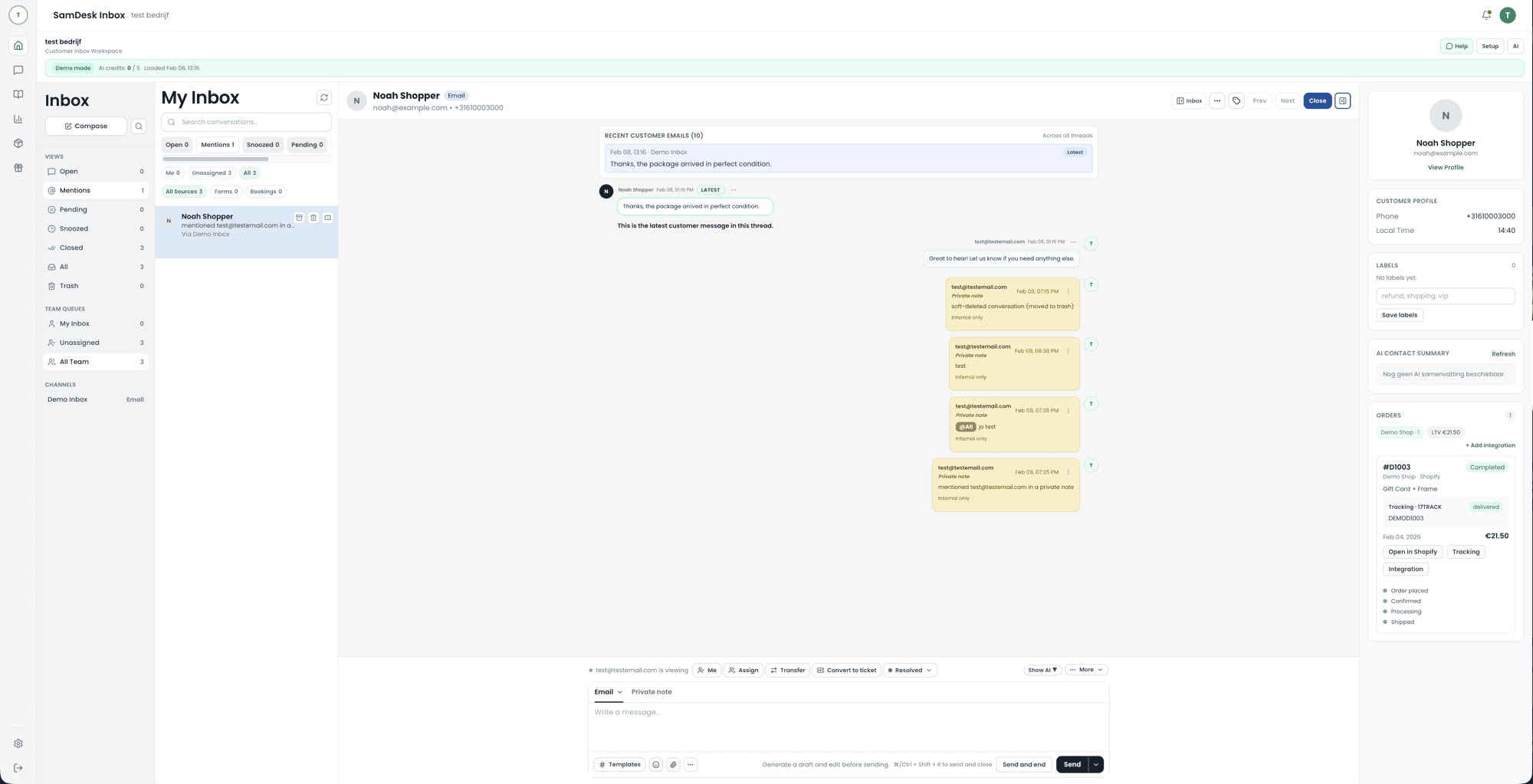
What it looks like
From a full queue to a sent reply, without anyone hunting through three screens for context.
What is a help desk (and why it matters)?
A help desk is the process + tooling used to handle support requests. Many teams run multiple help desks (e.g., ecommerce support, internal IT). With modern help desk solutions like SamDesk, you organize intake, priority, ownership, and follow-up.
Help desk agent workflow (what agents need)
A help desk agent wins time in three places: (1) triage, (2) context, (3) consistent answers. SamDesk combines ticketing, customer context, and a knowledge base so agents click less and close faster.
- Fast categorization (tags) + assignment
- Context: customer + order + history
- Knowledge base snippets + AI drafts
How does a help desk work, step by step?
From the outside a help desk looks like one email address. From the inside it is a fixed route every question travels. Teams that never make that route explicit end up with a shared inbox where everyone assumes someone else picked it up. These are the seven steps that are always there, however small the team.
- Intake. The question arrives by email, chat, form or phone and gets recorded once, whatever the channel.
- Ticket creation. The request gets a number, a status and a timestamp. From then on the whole team can see it.
- Enrichment. Customer details, order, earlier conversations and internal notes get attached next to the ticket.
- Triage and prioritisation. Topic, urgency and impact decide where the request lands in the queue.
- Assignment. One person or team takes ownership. Without an owner every other step is optional.
- Resolve or escalate. If first line can handle it, the answer goes out. If not, the ticket moves to a specialist with its context intact.
- Close and capture. The ticket closes, the fix goes into the knowledge base, and the handling time lands in reporting.
Step seven is the one most often skipped, and it is the only step that saves work next quarter. A solved question that goes unrecorded simply comes back.
What is level 1, 2 and 3 support?
Support levels are not a ranking from smart to smarter. They are an agreement about where a question gets solved fastest. The model comes from IT but works just as well in ecommerce support. Smaller teams often run L1 and L2 with the same people; the distinction then lives in the work, not the job title.
- Level 0 (self-service). Knowledge base, FAQ and status page. The customer solves it themselves and no ticket appears. Formally not a tier; in practice your biggest capacity gain.
- Level 1 (first line). First contact. Known questions, standard actions and anything a saved reply or a lookup can finish: order status, password reset, return requests. L1 either resolves it or hands it over cleanly.
- Level 2 (second line). Requests that need investigation: an order stuck technically, a non-standard return, a double charge. L2 knows the product deeply and is allowed to deviate from the script.
- Level 3 (third line). Developers, engineers or the vendor. Bugs, integration faults and outages that can only be fixed in code or infrastructure land here.
- Level 4 (external). Parties outside your company: carrier, payment provider, platform vendor. You own the case, but the fix sits with someone else.
The gain is not in the number of tiers but in the handover between them. An escalation that restarts with "could you give me your order number again" costs more time than the escalation saves. So define what information must travel with a ticket before it moves.
What counts as software support? Examples
"Software support" gets used for very different things, from a chat window inside an app to a maintenance contract with a vendor. These are the shapes you meet in practice:
- User support. Someone does not understand a feature or gets stuck in a screen. Answer: an explanation, a screen recording or a knowledge base link.
- Account and access support. Passwords, permissions, adding or removing users, two-factor that refuses to cooperate.
- Errors and bugs. Reproduce, record exactly what goes wrong and pass it to engineering with logs and steps attached.
- Installation, migration and configuration. Getting the tool working in your situation: moving data, building integrations, setting things correctly.
- Integration and API support. Questions about connections to your webshop, bookkeeping or shipping software. Usually L2 or L3 work, because the answer rarely sits in a manual.
- Maintenance and outages. Updates, planned maintenance windows and communication during an incident. A status page deflects more tickets here than any automation.
- Billing and subscription. Formally not software support, yet it arrives through the same channel. Decide up front who picks those tickets up.
Automated help desk: where automation works
An automated help desk isn’t about letting AI do everything. It’s about standardization: routing, SLAs, templates, and agent assistance. Start with tier 1: deflect repetitive questions with a knowledge base. Then add drafts, summaries, and smart tagging.
Help desk for IT: handling IT support tickets without noise
For a help desk for IT, you need clean intake (forms or inbox), clear priority, and fast escalation. Think tier 1 help desk for basics (passwords, access, resets) with handoff to specialists.
What should good help desk software provide?
Most help desk tools promise “inbox zero” but fail on fundamentals. Here’s what a modern help desk must nail (and what SamDesk is built around):
Intake that doesn’t leak
Email, forms, and handoffs land in one queue—nothing gets lost.
Ownership + SLA
Every ticket has an owner, status, and deadline—no open-ticket rot.
Context for the help desk agent
Customer + order + history instantly available. Fewer questions, faster closes.
Automated help desk (for real)
Routing, templates, summaries, and AI drafts. Not “AI answers everything”.
Telephony and mobile work: what to check upfront
SamDesk is built for written channels: email, chat, forms, and social messages. A built-in phone system with calling from the ticket is not part of it. If you need telephony, teams usually pick one of two routes: keep calls and tickets separate and log each call manually as a ticket with customer number and summary, or connect your own VoIP stack so call notes and links become available automatically. Ask your shortlist: should a call create a ticket automatically, do you want call-back from the ticket, and who owns the follow-up?
On mobile: SamDesk runs in the browser, so it also works on a phone or tablet, including replies, statuses, and customer context. There is no separate mobile app. Check with any vendor whether the mobile variant covers the same workflows you use at your desk, and whether SLA queues and escalations stay visible on the road; those two decide whether your team can actually help from outside the office or can only read along.
SamDesk vs Zendesk, Freshdesk and Jira Service Management
Zendesk offers a broad customer-service suite, Freshdesk combines ticketing with automation, and Jira Service Management is built around IT service teams. SamDesk has a narrower focus: a shared inbox with customer context, knowledge, and ticket workflows for support teams.
| Compare on | SamDesk | Zendesk | Freshdesk | Jira SM |
|---|---|---|---|---|
| Ticket workflows | Built-in, speed-first | Broad, many modules | Strong out-of-box | Great for IT teams |
| Help desk for IT | Possible, support-ops first | Yes | Yes | Core strength |
| Automated help desk | Staged AI + guardrails | AI-first positioning | AI assistant messaging | Automation for service teams |
When does your help desk need ticket workflows?
As soon as several people share one inbox. A workflow defines who owns a request, when it escalates, and when the ticket is actually resolved.
See Ticket Workflows (feature) →FAQ
What does help desk mean?
A help desk is where users or customers land with a problem or question. The word says nothing about the form: it can be a single email address, a phone number, or software turning every question into a ticket. What makes it a help desk isn’t the tooling but the agreement that questions arrive there and get handled there — not in a colleague’s personal inbox.
What is another word for help desk?
Service desk, customer service, customer support, support team, helpline, front office and contact centre all get used interchangeably. They are not all synonyms though. Service desk is broader and comes from ITIL: it also manages changes and services, not just incidents. Customer service refers to external customers, while a help desk can just as easily be internal. Front office describes a position in the organisation, not a type of request. In a tender or a job description it pays to ask what is actually meant.
What is an IT help desk (and how does it differ)?
An IT help desk supports your own staff: lost passwords, broken laptops, no access to a system. A customer service help desk supports people outside the company. The software looks similar, but the demands differ: internal revolves around devices, permissions and workstations; external around orders, returns and customer history. SamDesk is built for the second group.
Is there free help desk software?
Yes. osTicket is open source, and many paid tools offer a free tier for one or two agents. Just count the hidden costs: self-hosting, running updates, and someone to own it.
What are help desk solutions?
Help desk solutions are tools + processes to manage support tickets: intake, routing, SLAs, replies, and reporting.
Does help desk software work on a phone?
SamDesk runs in the browser, so it also works on your phone or tablet: replies, ticket statuses, and customer context are available on the road without a separate app. Check with any vendor whether the mobile view covers the same workflows as your desk setup; otherwise your team can only read along, not resolve.
What is the difference between a help desk and a help center?
A help desk is your team plus the tooling it uses to handle questions: inbox, tickets, response deadlines, and reporting. A help center is the customer-facing knowledge hub around it: articles, FAQs, and instructions that let customers solve things before a ticket exists. They belong together: the better your help center, the fewer tickets your help desk gets and the more time remains for questions that genuinely need a human.
How do I keep a help desk from becoming slow?
Combine context + knowledge base + workflows. Deflect tier 1 questions via self-serve and give agents templates/drafts.
