Latest activity queue
AI Desk reorders open conversations by the latest customer or team activity, so fresh replies do not hide behind older urgent tickets.
AI Desk
SamDesk brings recent customer activity to the top, opens each thread as chat, pulls in customer and order context, and prepares an AI draft. Sending or resolving still waits for an agent click.
Mila Vermeer
WooCommerce · open
Hi Mila, I checked your order P63002. Tracking is still marked in transit, but the latest scan is recent enough that I would not start a replacement parcel yet. I will monitor this today and send you an update as soon as the carrier scans it again.
AI Desk reorders open conversations by the latest customer or team activity, so fresh replies do not hide behind older urgent tickets.
Agents can send an AI draft, or send and resolve in one controlled step. Status changes only after that explicit action.
Customer data, order number, order status, tracking number, and tracking status sit in a collapsible context drawer beside the thread.
The AI keeps the active thread, last focus, and draft available, so follow-ups like “make it shorter” or “prepare this” do not start from scratch.
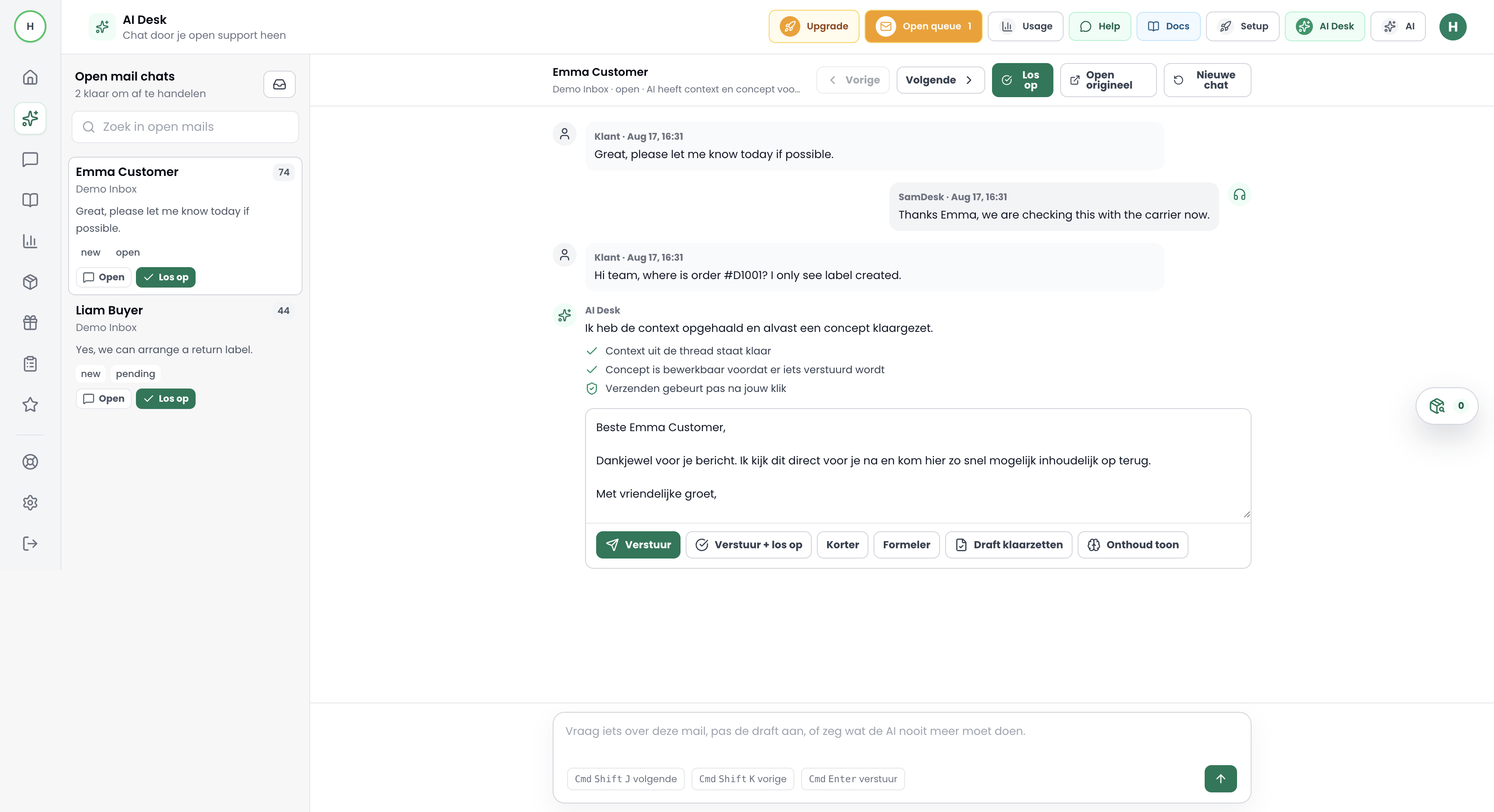
The left queue shows open mail chats by recent activity, with waiting time, status, priority, and a short preview.
Incoming and outgoing messages appear in a compact chat view. Long emails stay readable because full content expands only when needed.
AI Desk uses the selected conversation, previous draft, and chat instructions. The agent can ask for shorter, more formal, or more precise wording.
Send, send + resolve, or prepare the draft. Nothing is sent to the customer without a human click.
Agents do not copy context into a separate chat window. Queue, thread, draft, and action buttons stay in one screen.
For WISMO, return, and refund questions, the relevant order sits next to the email. That reduces guesswork and makes drafts more useful.
AI can prepare, rewrite, and remember context. Sending, resolving, and customer promises remain explicit team actions.
No. AI Desk can create or improve a draft, but sending happens only after an agent click.
Because recent customer replies matter operationally. Fresh work stays visible instead of sitting behind older scores.
No. WooCommerce is a recognizable example here, but the flow is built around ecommerce order context from connected shop data.
Start with a small queue, connect order context, and let your team send only after review.
Start free trial
Want to connect SamDesk to your workflow or need help choosing the right setup? Message Sam on WhatsApp or email [email protected].